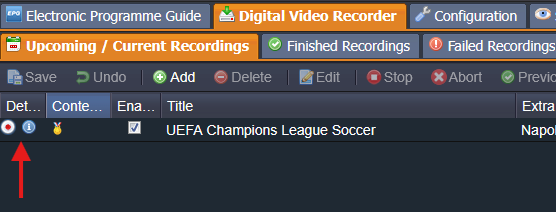
I've been doing some work on this new feature and I thought that it was time to present my progress and seek some feedback.
Definition
A 'Scheduling Conflict' occurs when there are more scheduled recordings than there are resources to service them. Currently, TVH will automatically resolve this situation by not recording one or more items.
Method
- All scheduled DVR Entries plus forward projections for enabled TimerRec entries are merged into a single test portfolio.
- The resources (adaptors) required to service the portfolio are assessed, including pseudo-adaptors for IPTV recordings.
- The portfolio is processed chronologically to identify instances where more recordings exist than available adaptors, or adaptors capable of reuse (same mux) have exhausted their PID capacity.
- All of the current recordings-in-progress, plus the unsuccessful recordings at that time are assembled into a 'Conflict 'Group'.
- Where a higher priority recording interrupts a lower priority recording, a scheduling conflict is also registered.
Why Conflict Groups?
Once recording priorities have been taken into account, because of the way that TVH manages its recordings, it is not always possible to predict with 100% accuracy which of a cohort of recordings starting at the same time will be unsuccessful. When an unsuccessful recording is detected, all overlapping recordings are added to a 'Conflict Group'.
1 [ AAAAAAAAAAAAAAAAAAAAAAAAAAAAAA ] 2
1 [BBBBBBBBBBBBBBBBBBBBBBBBBBBBBBBBBBBBB] 2
1 [ CCCCCCC
DDDDDDD ] 2
Assuming that the system has 2 adaptors and each recording is on a different mux, the example above shows 2 conflict groups. A recording can also belong to multiple conflicts groups.
Activation
There is a global setting that determine if TVH looks for scheduling conflicts. This setting is off by default.

Q1 Should this feature be OFF by default (user opts-in) or ON by default (user opts-out)?
Under normal circumstances, TVH will check for scheduling conflicts when one of the following object types is created/edited/deleted: DVR Entry, TimeRec, Channel, Service, Mux, Network, Adaptor.
If a recording is currently underway or there is a streaming subscription in progress, only DVR Entry and TimeRec objects will trigger checking scheduling conflicts. This may seem strange, but during recording/streaming, many of the above object type are constantly being updated with usage statistics, etc. This leads to almost continuous scheduling conflict checking.
Notification - WebUI
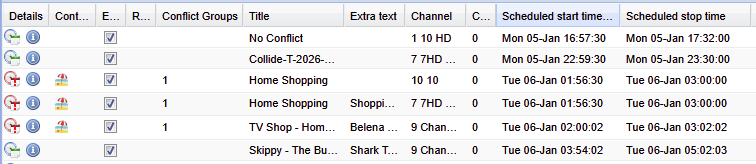
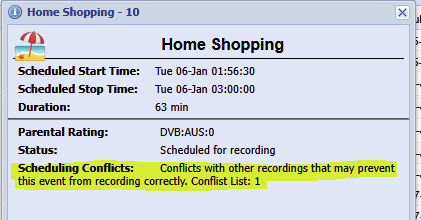
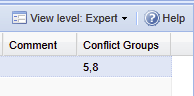
If a DVR Entry is part of a scheduling conflict group:
- The status icon will be changed;
- The conflict groups will be shown in their own column; and
- A message will be displayed in the details window.
If a DVR Entry is also linked to an EPG event:
- The status icon will be changed; and
- A message will be displayed in the details window.
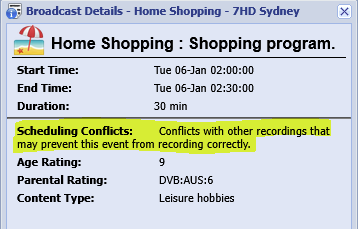
If a TimeRec is part of a conflict group:
- The conflict groups will be shown in their own column; and
- A message will be displayed in the details window.

Notification – JSON API
The existing DVR Entry and TimeRec JSON API calls have been updated to include 3 new conflict fields:
- Conflict flag;
- List of conflict groups; and
- An audit trail of the projected events.
New JSON API calls have been added to:
- Manually initiate a scheduling conflict check; and
- Obtain a list of conflict groups, their members and audit trails.
After a check for scheduling conflicts, any DVR Entry or TimeRec that is a member of a conflict group, or was until recently a member of a conflict group, will have an update message broadcast.
EPG events linked to any of the above entries will also have an update message broadcast.
Notification – HTSP API
- A conflict flag has been added to DVR and TimeRec objects; and
- Notifications described in the JSON API section will also be sent.
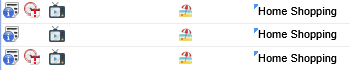
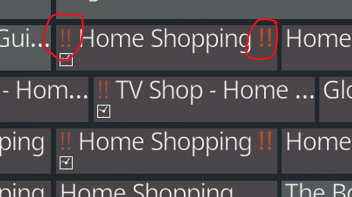
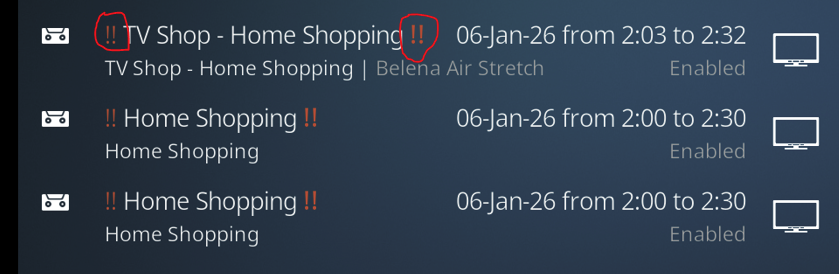
In addition to these, it is possible for the user to provide a custom prefix and suffix to add to the recording and EPG title fields to indicate the presence of a scheduling conflict. Depending on the client system, this feature could be used temporarily until support for scheduling conflict indication is added or permanently if necessary.
Here is a sample of what that could look like in Kodi.
EPG Grid
'Timers' List
Future Work (Potentially Phase II)
- Automatic Conflict Resolution: Given sufficiently accurate EPG data, TVH should be able to identify alternate screenings and select those in order to avoid a conflict. TVH already has the ability to do this for missed recordings, so hopefully utilising that mechanism should be possible.
- WebUI 'Scheduling Conflicts' Tab: A single screen on the WebUI for managing scheduling conflicts is required.
- Severity Levels: Some of the base work on this is complete but not yet provided to the user.
Conclusion
I'm not sure how much longer it will take me to release this feature, however, any feedback or questions on my current development would be appreciated. I should be able to implement simple stuff immediately, more complex suggestions may take some time or be deferred to the dreaded 'Phase II'.